
From Clomosy Docs
No edit summary |
ClomosyAdmin (talk | contribs) No edit summary |
||
| (4 intermediate revisions by 2 users not shown) | |||
| Line 1: | Line 1: | ||
<div class="alert alert-ligth border border-3 border-primary-subtle rounded-5 p-4 shadow-sm" role="alert"> | |||
function Trim(const S: string): string; | |||
</div> | |||
Trims leading and trailing spaces and control characters from a string.<br> | |||
Trim removes leading and trailing spaces and control characters from the given string S.<br> | |||
Use '''TrimLeft''' or '''TrimRight''' to limit the operation to just one end of the string.<br> | Use '''TrimLeft''' or '''TrimRight''' to limit the operation to just one end of the string.<br> | ||
<b>Example</b><br> | |||
''' | <pre> | ||
const | |||
textValue = ' Letters '; | |||
{ | |||
ShowMessage('/'+TrimLeft(textValue)+'/'); | |||
ShowMessage('/'+TrimRight(textValue)+'/'); | |||
ShowMessage('/'+Trim(textValue)+'/'); | |||
} | |||
</pre> | |||
<b>Output:</b><br> | |||
<gallery widths="150px" heights="300px" align="center" mode="nolines"> | <gallery widths="150px" heights="300px" align="center" mode="nolines"> | ||
| Line 21: | Line 27: | ||
File: TrimScreen.png | ''Trim Screen'' | File: TrimScreen.png | ''Trim Screen'' | ||
</gallery> | </gallery> | ||
<h2> See Also </h2> | |||
* [[System_Library#String_Functions | String Functions]] | |||
{{#seo:|title=Trim Using in Clomosy - Clomosy Docs}} | |||
{{#seo:|description=Trim removes leading and trailing spaces and control characters from a string, ensuring clean text for further processing.}} | |||
Latest revision as of 13:53, 24 December 2024
function Trim(const S: string): string;
Trims leading and trailing spaces and control characters from a string.
Trim removes leading and trailing spaces and control characters from the given string S.
Use TrimLeft or TrimRight to limit the operation to just one end of the string.
Example
const
  textValue = '      Letters     ';
{
  ShowMessage('/'+TrimLeft(textValue)+'/');
  ShowMessage('/'+TrimRight(textValue)+'/');
  ShowMessage('/'+Trim(textValue)+'/');
}
Output:
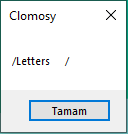
TrimLeft Screen

TrimRight Screen

Trim Screen


